Component 02 · Systems
whatsapp api providers
WhatsApp Lead &
Commerce System
KE builds WhatsApp Business API systems for businesses that need structured customer messaging, automated lead flows, segmented broadcasts, sales handoff logic, and CRM visibility — so WhatsApp becomes a managed growth channel, not a scattered inbox.
WhatsApp conversations should not depend on memory, manual follow-up, or one staff member’s phone. They need a system.
MOF #357-0002356673
Founded 2013
200+ projects delivered
WhatsApp API system journey
Opt-in
Consent capture · API-ready contacts
Segment
Tags, status, source, lifecycle
Broadcast
Approved templates · segmented sends
Nurture
Automated flows · follow-up sequences
Handoff
Routing logic · escalation rules
Report
CRM sync · campaign visibility
WhatsApp Business API — structured, compliant, measurable
The problem
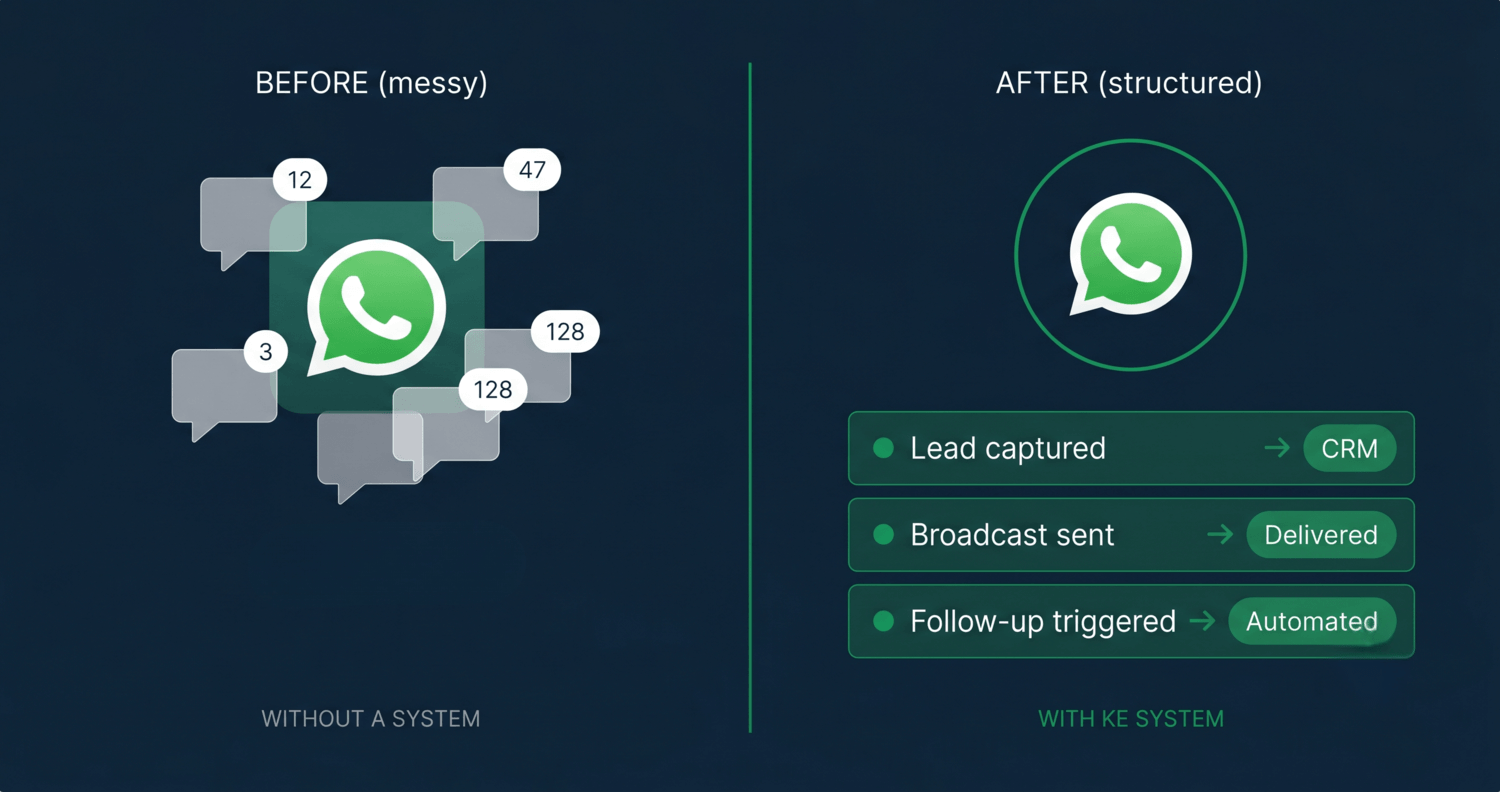
WhatsApp becomes messy when it grows without a system.
Most businesses start using WhatsApp because it’s where customers are. But without proper WhatsApp API infrastructure, structured flows, and governance, growing volume turns WhatsApp from a useful channel into a messy, hard-to-measure operation.
Conversations are scattered across phones and numbers
Customers message different staff numbers, branches, or inboxes. Without the right WhatsApp API setup, there is no central record, no shared inbox, and no visibility into what was discussed or what happens next.
Follow-up depends on memory and personal discipline
Without structured automation and reminder flows, every follow-up relies on a person remembering to send it. Response quality varies by staff, and conversations die when someone is unavailable.
Broadcasts are sent but not connected to outcomes
Messages go out to contact lists without template governance, delivery tracking, or CRM sync. Without API-connected reporting, there’s no way to measure what the broadcast actually produced in terms of replies, leads, or revenue.
A WhatsApp API Lead & Commerce System replaces manual messaging with structured opt-ins, segmented contact records, approved message templates, automated flows, webhook-driven handoffs, and CRM-connected reporting.
Is this right for you?
Signs your WhatsApp channel needs API infrastructure.
These are the most common triggers. If two or more apply, manual WhatsApp is already limiting what your business can do — and the gap widens every time volume grows.
1
Customers already prefer WhatsApp over email or web forms
Most enquiries, orders, or service requests arrive via WhatsApp. The channel is doing real commercial work — it just isn’t structured to do it at scale or with any visibility.
2
Leads arrive on WhatsApp but are not tracked or followed up via a system
Conversations happen, replies are sent, but there are no webhook integrations, no CRM records, and no automated follow-up cadence. Leads go cold because no flow triggers the next step.
3
Staff manually send reminders, confirmations, and updates
Appointment reminders, order status, registration confirmations — all written and sent by hand. It works at low volume, but it cannot scale and it cannot be measured without API-level automation.
4
Broadcasts go out without approved templates or API governance
Messages are sent to saved contact lists without segmentation, template pre-approval, or reply tracking. This approach creates compliance risk and produces no usable campaign data.
5
Sales, booking, or ordering conversations happen inside WhatsApp
Quotations, orders, and bookings are negotiated via WhatsApp but no system records them, routes them, or connects them to a CRM pipeline or commerce backend.
6
You want to scale WhatsApp without compliance or trust risk
The intent is to use WhatsApp more systematically — but without API infrastructure, opt-in governance, and template discipline, scaling creates exposure, not growth.
The broadcast trap
Sending more messages without API infrastructure, template governance, and opt-in control is not automation — it is risk. Contacts who haven’t opted in, messages without approved templates, and broadcasts without follow-up logic create complaints and platform consequences.
If the system is not designed properly, WhatsApp automation can damage trust faster than it creates sales.
What we build
Six capability areas in every WhatsApp API engagement.
These are not separate services — they are the interconnected components of a complete WhatsApp API system. Scope determines which areas are built and to what depth.
WhatsApp Business API Setup
WhatsApp Business Platform readiness, BSP or Meta Cloud API selection guidance, number setup direction, business verification readiness, webhook planning, and message template requirements — scoped to your business size and use case.
API readiness
BSP selection
Webhook planning
Opt-In & Contact Segmentation
Opt-in capture flows, contact source tagging, audience grouping by interest, lifecycle stage, and purchase history — structured for WhatsApp Business API use so every message reaches only opted-in, correctly segmented contacts.
Consent flows
Contact tagging
API segmentation
Template & Broadcast Journey Planning
Message template planning for utility, marketing, and authentication categories, prepared for Meta review. Broadcast journey architecture — segmented sends, campaign sequences, reactivation flows — built within API policy, template pre-approval requirements, and opt-out compliance.
Template design
Meta review
Campaign journeys
Lead Response & Nurture Flows
Webhook-triggered auto-replies for new enquiries, API-driven qualification question sequences, FAQ routing logic, structured follow-up reminder flows, warm lead nurture cadences, and re-engagement sequences for contacts who stopped responding.
Webhook triggers
Nurture sequences
Re-engagement
Human Handoff & Sales Routing
Routing logic that passes conversations to the right sales person, admin, or branch when human input is needed — with escalation rules, missed-response alerts, and task reminders connected to CRM records.
API routing
Escalation logic
CRM task sync
CRM & Dashboard Integration
Lead records, contact tags, conversation outcomes, and reply signals pushed from WhatsApp API into the CRM and reporting dashboards — so management sees delivery rates, reply rates, and campaign performance without asking the team.
Webhook-to-CRM
API reporting
Campaign data
These six areas are scoped inside every WhatsApp API engagement — they are not separate service pages. Depth depends on your current WhatsApp setup, contact volume, flow complexity, and integration requirements.
How it works
From opt-in to handoff —
the full WhatsApp API messaging system
Six layers — from how contacts enter the API system to how conversations become visible in the CRM and dashboards.
WhatsApp becomes a managed, API-powered growth channel —
compliant, automated, and connected to the CRM.
01
Opt-In Sources
Click-to-WhatsApp ads, QR codes, web forms, website widgets, in-store prompts, events — every API-connected entry point where contacts provide consent to receive messages.
02
Contact & Segment Layer
Contact records with tags, interest categories, customer status, lifecycle stage, and source attribution — so broadcasts and automation flows only reach the right audience.
03
Template & Message Layer
Meta-approved WhatsApp message templates — utility, marketing, and authentication categories — sent through the API with delivery confirmations, read receipts, and reply tracking.
04
Flow & Automation Layer
Auto-replies, nurture sequences, timed reminders, and conditional branching based on reply signals — the automation layer that responds consistently without staff doing it manually.
05
Human Handoff Layer
Routing rules that escalate conversations to the right person or team at the right moment — with missed-response alerts so no conversation goes cold without someone taking action.
06
CRM & Dashboard Visibility
API data — lead records, contact tags, reply signals, campaign outcomes — pushed to the CRM and reporting dashboards via webhook so management sees what WhatsApp is generating, not just what it’s sending.
Flow modules
Six WhatsApp flow types built inside every engagement.
These are the WhatsApp API flow components configured during the build. Which flows are included and to what depth depends on your business type, contact volume, and sales process.
Lead Capture
Welcome & Lead Capture Flow
Webhook-triggered instant auto-reply on first API message, guided qualification questions, contact tagging via API, and routing to the correct owner — so every new enquiry is captured and owned within seconds of arriving.
Broadcast
Broadcast & Campaign Flow
API-powered segmented broadcast campaigns using Meta-approved templates, sent to opted-in contacts with delivery and read tracking, reply handling, and conversion handoff — not bulk-sending to an unsegmented list.
Nurture
Nurture & Follow-Up Flow
API-driven warm lead reminder sequences, reactivation flows for contacts who stopped responding, appointment nudges, and structured follow-up cadences that run automatically via webhook triggers without staff intervention.
Commerce
Commerce Conversation Flow
API-structured product interest handling, quotation request flows, order status notifications, payment reminder messages sent as approved utility templates, and delivery or completion notifications synced to the CRM.
Reminders
Booking & Registration Reminder Flow
API-triggered appointment confirmations, event and programme reminders sent as approved utility templates at scheduled intervals, pre-consultation prep messages, and post-event follow-up sequences.
Support
Support & Escalation Flow
API-connected FAQ routing for common queries, webhook-triggered human handoff when conversations need a person, missed-response escalation alerts, and unresolved conversation follow-up to prevent customer drop-off.
Systemise & Migrate
Already using WhatsApp manually? We systemise and migrate it properly.
For businesses currently using the WhatsApp Business app manually — with saved replies, informal contact lists, or unstructured broadcasts — we assess the current setup and rebuild it properly using WhatsApp Business API, opt-in governance, approved templates, and CRM connectivity.
These API flow modules are configured inside every WhatsApp engagement. Not all six flows apply to every business — scope is confirmed during the Conversation Flow Discovery phase based on your actual WhatsApp usage and customer journey.
How we build
Four phases from discovery to system handoff.
Every WhatsApp API engagement follows the same structured process — so the flows and automation are built around your actual customer journey, not a generic template.
Phase 01
Conversation Flow Discovery
Map current WhatsApp usage, customer journey touchpoints, message types, opt-in sources, staff behaviour, and leakage points. Confirm API requirements and BSP selection direction.
Phase 02
WhatsApp API Architecture
Define opt-in rules, contact segments, approved template requirements, flow logic, webhook routing, CRM integration fields, and reporting structure. Architecture confirmed before build begins.
Phase 03
Platform Setup & Flow Build
Configure BSP or API access, register and submit message templates for Meta approval, build automation flows and webhook logic, connect CRM and dashboard integrations, and test all flows before launch.
Phase 04
Training, Handoff & Optimisation
Train admin and sales users on API platform, document flow logic and governance rules, support the launch period, monitor webhook response patterns, refine templates, and improve segmentation based on real data.
What you receive at handoff
WhatsApp API system architecture map
Opt-in & segmentation plan
Approved message template plan
Broadcast journey structure
Lead response & capture flow
Nurture & reminder flows
Webhook handoff & routing logic
CRM & dashboard integration map
WhatsApp API usage SOP
Admin & sales user training
Handoff documentation
Launch & optimisation notes
Scope boundary: This is a WhatsApp Business API lead and commerce system build. WhatsApp Business Platform fees, BSP subscription fees, message conversation or message charges, media buying, campaign creative production, large-scale copywriting calendars, call centre operations, and long-term WhatsApp API administration are separate scopes unless explicitly included in the proposal.
Investment
Priced by API scope and system complexity.
The right tier depends on your current WhatsApp setup, contact volume, flow complexity, and how deeply the API system needs to connect with your CRM and reporting tools.
TIER 01
WhatsApp Flow Audit & Restructure
From
6,800
Best for
Currently on WhatsApp Business app — needs flow audit, restructure, and API migration planning
Contact lists exist but lack opt-in compliance or segmentation
Broadcasts sent without approved templates or API governance
Restructure flows, consent, and basic automation within a proper API setup
TIER 02
WhatsApp API System Setup & Flows
From
15,000
Best for
Full API setup with opt-in, segmentation, and template governance
2–3 core flows (lead capture, nurture, broadcast) via webhook automation
Human handoff routing and missed-response alerts
Basic CRM connection via API and usage SOP
Admin and sales user training + documentation
TIER 03
WhatsApp Commerce & CRM Integration
From
28,000
Best for
4+ API flow types including commerce and booking reminders
Deep CRM integration via webhook with lead records and pipeline sync
Broadcast campaign sequences with API-level reply handling
Reporting dashboard connected to WhatsApp API activity data
Advanced segmentation and API-driven lifecycle journey design
TIER 04
Multi-Branch / High-Volume WhatsApp API
Scoped after
Custom Proposal
Suitable for
Multiple branches or teams requiring separate API routing and numbers
High-volume contact lists requiring BSP-level infrastructure at scale
Complex CRM, ERP, or commerce system API integration
Government or corporate programme WhatsApp API operations
Multi-language or multi-region API deployment
Final investment depends on current WhatsApp setup, API migration requirements, contact volume, flow complexity, BSP selection, and CRM integration depth. Some engagements may begin with a paid diagnostic or scoping step before the final build proposal. Any credit arrangement will be stated clearly before payment. WhatsApp Business Platform fees, BSP subscription fees, and message conversation charges are separate costs not included in KE service fees unless explicitly stated in the proposal.
Example scopes
What a WhatsApp system
looks like in practice.
These are representative build scopes based on common WhatsApp API usage patterns. Your actual system is scoped around your specific customer journey and business type.
Retail & O2O Campaign
A retail chain running promotions without API opt-in or template governance
Situation
Promotional messages were sent to a saved contacts list via WhatsApp Business app without opt-in structure, API template pre-approval, or delivery tracking. There was no visibility into who received, replied, or redeemed vouchers.
System built
WhatsApp API setup with opt-in capture via QR codes at outlets. Segmented broadcast journeys using approved marketing templates. API-triggered voucher reminder flows sent at timed intervals. Reply handling routed via webhook to the correct outlet team.
What became easier
Broadcasts sent only to opted-in, segmented contacts using Meta-approved templates. API delivery and read data available per campaign. Management can see broadcast performance without manual tracking or staff reports.
Example scope · Typical build: Tier 2 Integrated System Build
Training & Programme
A training provider handling registrations and reminders entirely via manual WhatsApp
Situation
Enquiries arrived on WhatsApp and were handled one by one manually. Registration confirmations and session reminders were written and sent by hand. When intake volume grew, manual handling could not keep up and messages were missed.
System built
WhatsApp API with webhook-triggered welcome flow for new enquiries. Registration confirmation sent automatically via approved utility template on payment or approval. API-driven reminder sequence at multiple intervals before each programme date. Post-session follow-up for certification or next intake.
What became easier
Registrations confirmed and reminded via API without coordinator intervention. Participants receive consistent, timely utility messages regardless of intake size. Coordinator handles exceptions — not routine confirmations that the API handles automatically.
Example scope · Typical build: Tier 3 Multi-Module Operating System
High-Ticket Sales
A high-ticket business where WhatsApp enquiries are handled differently by each consultant
Situation
Leads sent initial enquiries via WhatsApp. Some consultants responded immediately, others took hours. Follow-up was inconsistent. Management had no API-level visibility into lead volume, response times, or which conversations had progressed.
System built
WhatsApp API with instant webhook-triggered auto-reply capturing qualification details. API routing to the assigned consultant with a webhook-fired task reminder if no response within a defined window. Appointment confirmation and pre-consultation reminders via approved utility templates. Post-consultation follow-up sequence for proposal or next step.
What became easier
Every enquiry receives an immediate API-powered response regardless of arrival time. Consultants are notified via webhook and reminded automatically. Management sees enquiry volume, API response patterns, and conversation progression without asking each consultant for a status update.
Example scope · Typical build: Tier 1–2 depending on integration needs
Common Questions
Frequently asked questions
Still have questions?
The fastest way to get a direct answer is a Fit Discovery Call — free, 30 minutes, no pitch.
Get a System Proposal →MOF #357-0002356673 · Elite Growth Tech Sdn Bhd
Ready to build
Turn WhatsApp into an API-powered growth channel.
Tell KE how you’re currently using WhatsApp — manual replies, unstructured broadcasts, or conversations with no CRM visibility. We’ll map the right API scope and confirm the investment before anything is built.
MOF #357-0002356673
200+ projects delivered
Founded 2013
Scope confirmed before build begins