Component 02 · Systems
CRM Implementation Consultant
CRM & Lead Operations
System
KE builds CRM and lead operations systems for companies that need cleaner lead capture, pipeline stages, follow-up workflows, source tracking, sales visibility, and reporting — so every enquiry can be managed from first contact to conversion.
Leads do not become revenue just because they enter your inbox. They need a system.
MOF #357-0002356673
Founded 2013
200+ projects delivered
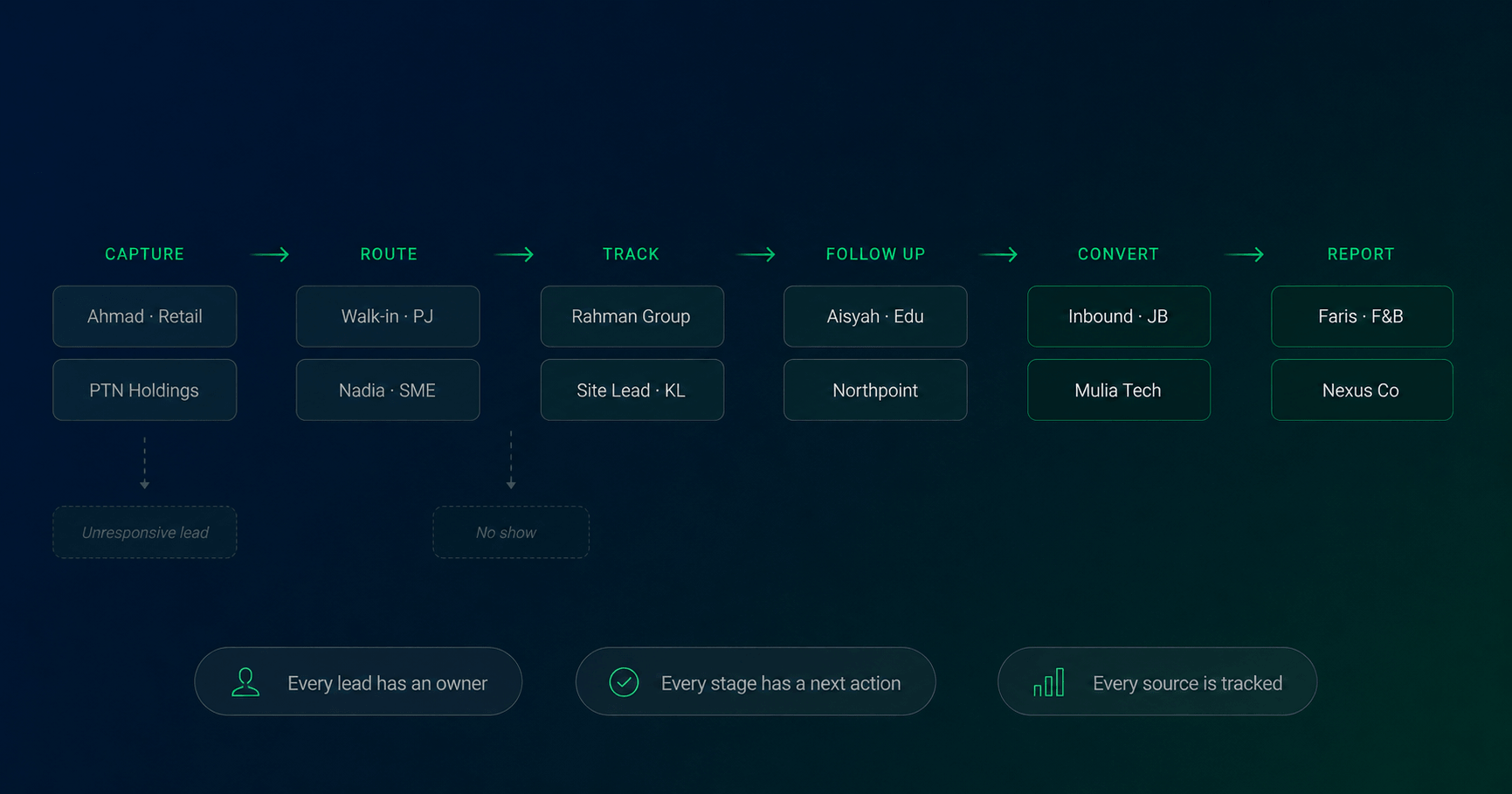
Lead operations pipeline
Capture
Forms, ads, WhatsApp, events → CRM
Route
Assignment rules, branch, salesperson
Track
Pipeline stages, status, source
Follow Up
Tasks, reminders, WhatsApp/email flows
Convert
Proposal, booking, won/lost status
Report
Source quality, conversion, attribution
Every lead tracked from first touch to closed deal
The problem
Lead generation breaks when lead operations are weak.
Most companies invest in generating leads and then lose them to slow follow-up, inconsistent qualification, and zero pipeline visibility. The problem is rarely the marketing. It is what happens after.
Leads are captured but not controlled
Enquiries arrive through website forms, WhatsApp messages, paid ads, phone calls, and walk-ins — but there is no single system of record. Leads get lost, duplicated, or simply forgotten.
Follow-up depends on individual discipline
Salespeople manage leads in their own phones, personal notes, or memory. Response time and follow-up cadence vary by person. When someone leaves, the leads they held go with them.
Management cannot see what happens after marketing
Teams can report ad spend, impressions, and form submissions — but not enquiry quality, sales activity, proposal status, or which leads actually closed. Marketing and sales are disconnected.
A CRM & Lead Operations System connects lead capture, routing, pipeline stages, follow-up actions, and reporting into one structured sales workflow — so no enquiry is left without an owner, a status, and a next action.
Is this right for you?
Signs your lead operations need a system.
These are the most common triggers. If two or more apply, leads are already leaking — and the problem compounds every time you increase your marketing spend.
1
Leads come from multiple sources but aren’t centralised
Website forms, WhatsApp enquiries, paid ads, events, and referrals all flow into different places. There is no single record of who enquired and when.
2
Sales follow-up happens manually through WhatsApp or personal notes
Each salesperson manages their own leads in their own way. Response time, follow-up frequency, and handoff quality vary completely by individual.
3
You can’t tell which channel or campaign produces quality leads
You know which ads generate the most form fills. You don’t know which ones generate leads that actually close. Attribution stops at the click.
4
Pipeline stages are undefined or not updated consistently
There is no agreed definition of what “qualified,” “proposal sent,” or “negotiating” means. Every salesperson interprets stages differently, making pipeline reports unreliable.
5
Leads get lost between teams, branches, or consultants
Leads assigned to one person fall through the gap when they are unavailable, reassigned, or leave. There is no visibility into uncontacted or stale leads.
6
You are scaling ad spend but your follow-up system isn’t ready
More budget means more leads. But without a structured pipeline, more leads just means more leads to lose. Volume without a system accelerates the problem.
The media spend trap
Many businesses respond to flat sales by increasing ad budgets. If the lead operations system is broken, more spend creates more leakage — not more revenue.
If you are increasing media spend without a lead operations system, you may simply be creating more leakage.
What we build
Six signals your company needs a Brand OS Build.
Brand OS is not only for companies launching from scratch. It is most valuable — and most urgently needed — when a growing business hits the wall where founder-dependency and brand inconsistency start costing real opportunities.
CRM Setup & Configuration
CRM structure, contact and company fields, pipeline settings, user roles, and permission levels configured from scratch or restructured from an existing setup.
Field mapping
User roles
Pipeline settings
Lead Capture & Source Tracking
Website forms, landing pages, and ad platforms connected to the CRM. Every lead tagged with source, campaign, and channel — automatically, not manually.
UTM tracking
Form integration
Source attribution
Pipeline & Stage Design
Defined sales stages built around the actual sales motion. Stage definitions, qualification criteria, won/lost reasons, and stage movement rules for consistent pipeline hygiene.
Stage definitions
Qualification criteria
Won/lost tracking
Lead Routing & Assignment
Automatic assignment rules that route leads to the right salesperson, branch, or team based on source, product interest, geography, or capacity.
Assignment rules
Branch routing
Escalation logic
Follow-Up Workflow & Automation
Task creation, reminders, and structured follow-up cadences tied to pipeline stage. WhatsApp and email notification triggers. Missed follow-up alerts that surface stale leads before they go cold.
Task reminders
WhatsApp triggers
Stale lead alerts
Sales Dashboard & Reporting
Pipeline visibility by stage, source, salesperson, and time period. Lead volume trends, response time tracking, stage conversion rates, and revenue outcome reporting — in one management view.
Pipeline visibility
Source quality
Conversion rates
These six areas are scoped inside every CRM & Lead Operations engagement — they are not separate service pages. The depth of each area depends on your CRM condition, lead volume, team structure, and integration requirements.
How it works
The KE Lead Operations Architecture
Six layers — from the sources that generate leads to the reporting layer that tells you what’s working.
Every lead tracked, followed up, and attributed —
from first touch to closed deal.
01
Lead Sources
Ads, organic search, website forms, WhatsApp, events, and referrals — each mapped and tagged before entering the system.
02
Capture Layer
Forms, landing pages, ad integrations, and manual entry — all connected to the CRM with source attribution built in from day one.
03
CRM Record
One structured record per lead — contact, company, source, product interest, status, and ownership. The single source of truth for every enquiry.
04
Routing & Ownership
Assignment rules route leads to the right salesperson, branch, or team automatically. Every lead gets an owner — immediately.
05
Pipeline & Follow-Up
Defined stages, task-based follow-up cadences, and automated reminders. Every stage has a next action — not just a status label.
06
Reporting & Optimisation
Pipeline by stage, source quality, response time, and revenue outcome — visible in one dashboard. Marketing and sales finally connected.
Scope components
What gets built inside every engagement.
These are the implementation components of a CRM & Lead Operations build — not a repeat of the capability overview. Each is configured to the depth your workflow, team structure, and integration needs require.
CRM Setup
CRM Data Structure
Fields, record types, user roles, permissions, and pipeline settings configured around your actual sales data — not generic CRM defaults that need to be undone later.
Lead Capture
Lead Source Integration
All inbound lead sources — forms, landing pages, ad platforms, WhatsApp, and manual entry — connected to the CRM with source and campaign tags applied automatically at entry.
Pipeline
Pipeline Rules & Stage Logic
Stage definitions, qualification criteria, stage movement rules, and won/lost reason codes — built so every salesperson uses the same pipeline in the same way.
Routing
Routing & Ownership Logic
Assignment rules that route every inbound lead to the correct owner immediately — by source, location, product, or team. Escalation logic for leads that haven’t been contacted within the defined window.
Follow-Up
Follow-Up Task Cadences
Task creation, structured follow-up sequences, and WhatsApp or email notification triggers tied to pipeline stage. Stale lead alerts surface uncontacted enquiries before they go cold permanently.
Activity Tracking
Sales Activity Tracking
Calls, meetings, proposals, appointments, notes, and stage movement all logged against each lead record — so sales activity is visible in the CRM, not hidden in personal chats or memory.
Activity Tracking
Sales Activity Tracking
Calls, meetings, proposals, appointments, notes, and stage movement all logged against each lead record — so sales activity is visible in the CRM, not hidden in personal chats or memory.
These six scope components are configured inside every CRM & Lead Operations engagement. The audit/restructure path applies when an existing CRM is being rebuilt rather than started fresh. Depth per component depends on your CRM condition, team structure, lead volume, and integration requirements.
How we build
Four phases from discovery to handoff.
Every CRM & Lead Operations engagement follows the same process — so the system fits your actual sales workflow before anything is configured.
Phase 01
Lead Flow Discovery
Map current lead sources, sales process, follow-up behaviour, CRM tools in use, and leakage points. Identify what exists, what’s broken, and what the system must fix.
Phase 02
CRM & Pipeline Architecture
Define CRM fields, pipeline stages, routing rules, ownership logic, source tracking, automation triggers, and reporting requirements. Architecture locked before build begins.
Phase 03
System Setup & Integration
Configure CRM, connect all lead sources and forms, set up automation, WhatsApp/email notifications, dashboards, and user permissions. All integrations tested before handoff.
Phase 04
Training, Handoff & Optimisation
Train sales and admin users, deliver CRM usage SOP, support the go-live period, monitor adoption, and refine pipeline logic and reporting after real usage begins.
Also includes
CRM setup or cleanup
Pipeline stage map
Lead status & qualification rules
CRM field structure
User roles & permissions
Lead source tracking setup
Form & landing page integration
Lead routing & assignment logic
Follow-up task & reminder workflows
Sales activity tracking rules
Pipeline dashboard & reporting view
CRM usage SOP
Admin & sales user training
Handoff documentation
Scope boundary: This is a CRM and lead operations system build. Media buying, sales hiring, sales commission design, call centre operations, advanced enterprise CRM licensing, custom mobile app development, and long-term CRM administration are separate scopes unless explicitly included in the proposal.
Investment
Priced by scope,
not by hours.
The right tier depends on your CRM condition, lead volume, team structure, and how many sources and integrations are involved.
TIER 01
Brand OS Foundation Sprint
From
12,000
Best for
Existing CRM that is messy, inconsistently used, or not connected to real sales activity
Pipeline stages undefined or not followed
Restructure fields, stages, routing, and basic reporting
No new platform setup — works within current CRM
TIER 02
CRM & Lead Operations Setup
From
18,000
Best for
Full CRM setup from scratch or major rebuild
2–3 lead sources connected with source tracking
Pipeline stages, routing, and follow-up automation
Sales dashboard and basic reporting
Admin and sales user training + documentation
TIER 03
Integrated Lead Operations System
From
38,000
Best for
4+ lead sources with full attribution tracking
Complex routing across branches, teams, or products
Multi-stage automation and WhatsApp/email workflows
Advanced pipeline reporting and management dashboard
Integration with website, ads, and existing tools
TIER 04
Enterprise / Multi-Branch CRM Operations
Scoped after
Custom Proposal
Suitable for
Large sales team with complex territory or branch routing
Multi-product pipeline with separate stage logic
Deep CRM integration with existing enterprise systems
High-volume lead operations with SLA governance
Corporate or government sales operations build
Final investment depends on CRM condition, lead source complexity, integration requirements, user roles, automation depth, and reporting needs. Some engagements may begin with a paid diagnostic or scoping step before the final build proposal. Any credit arrangement will be stated clearly before payment.
Example scopes
What a lead operations system
looks like in practice.
These are representative build scopes based on common lead operations problems. Your actual system is scoped around your specific sales workflow and team structure.
B2B Lead Generation
A B2B company running ads with no visibility into what closes
Situation
The sales team received leads from Google Ads and LinkedIn but managed them in personal WhatsApp chats. Management had no pipeline visibility. No one knew which channel produced leads that actually converted into clients.
System built
CRM configured with source-tagged lead capture from both ad platforms. Pipeline stages built around the B2B sales cycle. Follow-up task automation with missed-contact alerts. Sales dashboard showing lead volume, stage conversion, and revenue by source.
What became easier
Management can compare closed opportunities by source, making budget decisions based on pipeline quality instead of form-fill volume alone. Marketing and sales are no longer operating from different datasets.
Example scope · Typical build: Tier 2 CRM & Lead Operations Setup
Property & High-Ticket Sales
A property developer losing leads between enquiry and appointment
Situation
Leads came from Facebook ads and website forms but follow-up was inconsistent. Consultants contacted some leads quickly, others days later. No structured appointment tracking. Management couldn’t see how many leads were stale or uncontacted.
System built
CRM with enquiry-to-appointment pipeline stages. WhatsApp follow-up notifications triggered on new lead assignment. Escalation alerts for leads uncontacted after 2 hours. Proposal and visit tracking built into the pipeline flow.
What became easier
Response time becomes visible by salesperson, stale leads surface earlier, and management can track appointment conversion rate without a manual report or daily check-in with each consultant.
Example scope · Typical build: Tier 2–3 depending on team size
Multi-Outlet & Branch Business
A retail chain with branches receiving leads that no one owns
Situation
Leads from a national campaign landed in a shared inbox. Branch managers didn’t know which leads were for their location. No routing logic, no assignment, no follow-up structure. HQ had no visibility into how branches handled enquiries.
System built
CRM with location-based routing rules assigning leads to the correct branch manager automatically. Per-branch pipeline view for HQ oversight. Follow-up reminders with escalation to area manager if uncontacted. Lead source tracking per campaign and per channel.
What became easier
Every lead routed to a named owner within minutes of arriving. HQ sees follow-up rate and pipeline status by branch without calling each manager. Campaigns with poor location-level follow-up identified and addressed.
Example scope · Typical build: Tier 3 Integrated Lead Operations System
Common Questions
Frequently asked questions
Still have questions?
The fastest way to get a direct answer is a Fit Discovery Call — free, 30 minutes, no pitch.
Get a System Proposal →MOF #357-0002356673 · Elite Growth Tech Sdn Bhd
Ready to build
Stop losing leads after you generate them.
Tell KE where the pipeline is breaking — scattered sources, slow follow-up, no visibility, or a CRM nobody uses. We’ll map the right scope and confirm the investment before anything is built.
MOF #357-0002356673
200+ projects delivered
Founded 2013
Scope confirmed before build begins